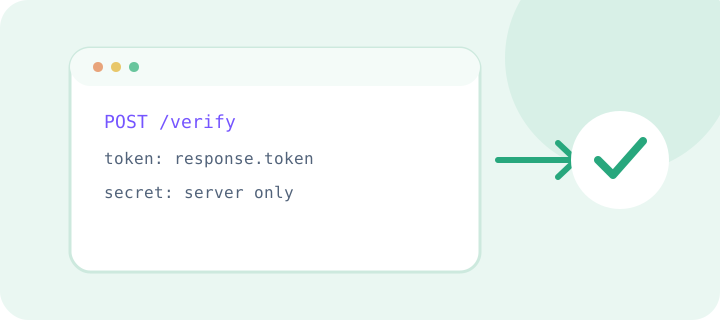
JavaScript can render a browser widget, but secret verification belongs to the server side of your application. Do not put a secret key in the client bundle: visitors can inspect it. Send the token to your backend over HTTPS and verify it with the provider.
On the server, use an official HTTP client, bound response time, and validate the response structure. In tests, separate widget code from API verification so each interface state can be checked independently. If you use a SPA, keep verification state with the form and reset it after an error or token expiry.
Scope and decision criteria
The topic “CAPTCHA in JavaScript: browser and server” is useful when it is tied to a specific user action and a concrete risk to the service. Start by recording which event is protected, who may perform it, and what a successful outcome means. The existing overview is a starting point, not a complete requirements list: a check may fit account creation yet be unnecessary on a public information page.
For “CAPTCHA in JavaScript: browser and server”, define the boundaries before choosing an implementation: which forms and environments are included, and which remain outside scope. Record browser, server, network, accessibility, and data-handling constraints. This map keeps widget setup, server verification, and business authorization from collapsing into one opaque step.
This article belongs to “Languages and stacks”. Do not apply a recommendation mechanically to a different task: first compare the goal, user permissions, and consequences of failure. If the conditions differ, record that as a separate requirement and include it in the test plan.
Decide before changing code
Compare options by their effect on the real user journey, not by the number of settings they expose. Check where waiting occurs, who sees an error, whether a retry is safe, and what happens when an external provider is unavailable. If another control already addresses the risk, CAPTCHA may be needed only under specific conditions instead of on every submission.
Before implementation, state a testable assumption: which unwanted action should become harder, and what signal would show that legitimate users are being blocked. Do not invent numerical thresholds. Record a baseline for errors and successful completions, then compare behavior after a small, controlled change.
Compare at least three outcomes: verification accepted, verification rejected, and no provider response. Record the form state and server action for each. This decision table makes the discussion concrete and helps align the technical choice with support and the product owner.
Where verification belongs in the architecture
Keep three responsibilities separate. The client presents the interface and sends the verification response with the original form. The server checks that response with the provider and makes the authorization decision. The business layer performs the protected action only after its own rules and checks pass. Secrets and final authorization must not depend on browser code that a visitor can modify.
For “CAPTCHA in JavaScript: browser and server”, mark the boundaries between components: who creates the request, who verifies the token, where a timeout applies, and which layer owns retries. Pass only the data each layer needs and map provider errors to clear internal states. This makes failures easier to diagnose and avoids coupling the whole product to one external response format.
Draw the trust boundary before implementation: the browser submits data but does not establish that it is valid; the server checks the response in the context of a specific operation; and the business layer applies product rules. Do not accept a client-side “verified” flag in place of a server result.
A practical walkthrough
Consider a fictional exercise: a team adds “CAPTCHA in JavaScript: browser and server” to one test form first. An engineer records the path from page load to server response, QA checks accepted and rejected outcomes, and the process owner chooses safe behavior for dependency failures. This is an illustrative method, not a report of a real deployment or a claim about measured impact.
Walk through the sequence: open the form, perform the action, submit the verification response, wait for server-side validation, and inspect the final state. Then repeat with a missing or expired response. Check more than the error text: review form-data retention, duplicate submissions, and the event record.
For reproducibility, keep the test scenario with the form documentation: preconditions, actions, expected response, and cleanup. If the article covers a library or platform, identify the integration point in that stack, then verify parameter names and method signatures against the official documentation for the version in use.
States the integration must handle
Do not reduce every failure to a generic “error.” Distinguish a missing response, a rejected check, an expired token, a timeout, and temporary provider unavailability. The user needs a next step; an operator needs a safe status category and correlation identifier. Never expose secret keys, full tokens, or internal infrastructure details.
Retries need explicit rules. First determine whether the server-side action may already have happened; then decide whether only verification can be repeated or a new user attempt is required. For side effects, separate retrying verification from charging, creating an account, or publishing content. Align the exact policy with the application’s own behavior.
| Situation | Check | Response |
|---|---|---|
| Normal user journey | Is the reason for the check clear, and does the original action complete? | Keep the path simple and feedback understandable |
| Response missing or rejected | Is form data retained, and can the user retry safely? | Give a next step without exposing internal details |
| Provider or network unavailable | Is there a bounded, safe failure mode? | Do not blindly repeat the business action; offer recovery |
| Configuration changes | Was the new setup checked separately from production? | Roll out gradually and preserve rollback |
A test plan based on explicit expectations
Test the flow at several layers. A unit test checks server behavior against controlled responses. An integration test checks request construction and response parsing. A browser test observes the actual form journey. Use test keys or a controlled stub where the selected provider supports them; do not turn production credentials into test fixtures.
For every test, state its inputs, expected status, and final form state. Include empty, invalid, and expired tokens, delays, repeated submissions, and dependency failures. Confirm that secrets do not enter the client bundle or logs. When provider behavior changes, compare the test setup with that provider’s current documentation.
| Layer | Input | Expected check |
|---|---|---|
| Unit | Accepted and rejected stub responses | Server accepts only the intended state |
| Integration | Request using test configuration | Request fields and response parsing match documentation |
| Browser | Complete test form submission | Errors are clear and entered data is retained |
| Operations | Timeout or temporary dependency error | Bounded recovery behavior is applied |
Observe the flow after release
After release, observe the complete chain: challenge display, response submission, server verification, and completion of the original action. Group failures by safe categories and configuration version. Do not judge quality from one metric: an increase in rejections may come from networking, form changes, token expiry, or an integration update.
Write a short response plan: where to check provider status, who can roll back a change, how to limit an affected feature temporarily, and how to restore the normal path. Exercise the plan in a test environment. For each configuration change, record owner, time, environment, and change reference without logging secret values.
Separate user-facing observations from technical ones. The first group includes form completion, retries, and message clarity. The second includes response category, waiting time, environment, and configuration version. Correlate signals by time and release, but collect no more data than needed to investigate an incident.
Accessibility and data minimization
Collect only information needed for security and diagnosis. Do not put a secret key or full token in a URL, browser analytics, error message, or broadly available log. Review what is sent to the provider, and offer an alternative route when a visual challenge is unavailable or incompatible with someone’s way of interacting.
Check the form with a keyboard, on a small screen, and with available assistive technology. Instructions should not rely on color or tiny details; focus should be visible; and an error should explain the next step. Provide recovery after a reload or network interruption so people do not have to re-enter the whole form.
Review translated instructions and errors as well: localization must preserve the meaning of statuses and must not encourage endless retries. Set a predictable keyboard focus order and do not block access to the form simply because an interactive element did not work on the first attempt.
Common mistakes and how to avoid them
A common mistake is testing only the happy path in a browser. That misses server-side bypasses, duplicate submissions, and expired responses. Another is retrying forever: this increases load and may repeat a business action. Set a bounded retry policy, controlled delay, and a clear route into a manual or alternative process.
A further mistake is changing rules for everyone at once without observing the result. Start in a test environment or with a limited rollout, set stop criteria, and keep a way to restore the prior configuration. CAPTCHA is not a universal answer to abuse: rate limits, moderation, address confirmation, or server-side event analysis may address a specific problem with less friction.
For “CAPTCHA in JavaScript: browser and server”, also verify that environments stay separate: test keys belong to test domains, production secrets are stored separately, and a local stub cannot accidentally approve an operation in production. Configuration changes should receive normal review and have a clear rollback plan.
Working checklist
- Describe the protected action and the risk to reduce.
- Map client, server, provider, and environments.
- Keep secrets server-side and verify before the business action.
- Handle rejection, timeout, retry, and dependency outages.
- Check keyboard, mobile, and test-response behavior.
- Define safe event categories and a rollback plan.
- Update the documentation and name an owner.
The integration owner should know where configuration lives and how to check it after release. If that person is unavailable, documentation and a safe change log should let the on-call engineer restore service without searching source code or message history for secrets.
Frequently asked questions
Should CAPTCHA appear on every action?
There is no universal rule. Balance the operation’s risk against added friction, and use a check where it addresses a specific need.
Can the browser response be trusted on its own?
The server should make the final decision after checking the response with the provider. Client-side code can be changed, so it is not a trust boundary.
What if verification is temporarily unavailable?
Choose safe behavior in advance: a bounded retry, an alternative check, or temporary unavailability for that operation. Do not silently perform the protected action without verification.
What should be logged to diagnose a failure?
A timestamp, environment, result category, and correlation identifier are often enough. Do not log the secret key or complete verification token.
How can the integration be checked before release?
Use test keys or a stub, cover accepted, rejected, timeout, and retry paths, then run a browser flow in staging.
These answers describe general practice. Exact request fields, token lifetime, limits, and activation steps depend on the selected provider and API version. Before configuring production, confirm those details in the provider’s primary documentation.